Business Continuity (Fallback Plan)
Ensure business processes are not blocked when verification service is abnormal
Core Principle: When the verification service is abnormal, allow requests through to avoid blocking business processes. Always prefer availability over blocking.
Quick Overview
What is the Fallback Plan?
When the Geelab verification service is temporarily unavailable, it automatically allows users to pass verification to avoid blocking your business flows (e.g., login, registration).
Who needs to act?
- ✅ Backend developers: Must implement server-side fallback logic (focus of this document)
- ℹ️ Frontend developers: SDK handles this automatically — only domain allowlist configuration required
- ℹ️ DevOps/SRE: Should configure monitoring and alerting
Fallback Flow Diagram
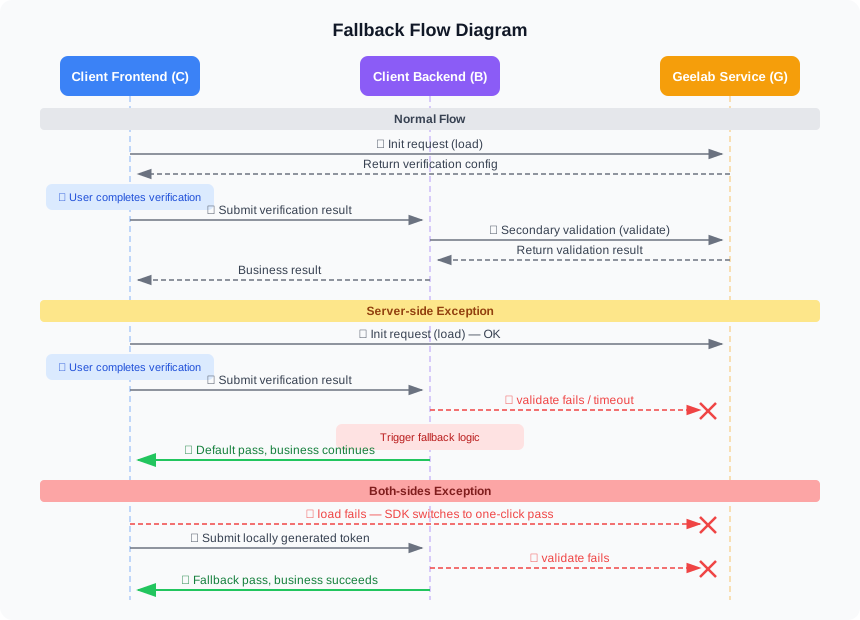
Trigger Conditions and Exception Scenarios
Fallback mode is triggered automatically in the following situations:
| Trigger Condition | Impact | Fallback Behavior | User Experience |
|---|---|---|---|
| Client load request fails (HTTP status ≠ 200 or timeout) | Frontend captcha cannot load | Captcha automatically switches to one-click pass mode | Click to pass immediately |
| Server validate request fails (HTTP status ≠ 200 or timeout) | Secondary validation cannot complete | Server returns default success result | Login/registration proceeds normally |
| Both sides fail simultaneously | Frontend and backend both unavailable | One-click pass + backend default success | Business completely unaffected |
Fallback mode triggers automatically — no manual intervention required. The SDK and server-side code handle exceptions automatically.
Server-Side Implementation
The following code should be added to your secondary validation endpoint, replacing the existing validation logic. For complete integration examples, see the Server Integration docs.
import requests
import logging
from datetime import datetime

def validate_captcha(lot_number, captcha_output, pass_token, gen_time):
    """
    Secondary validation function with fallback.

    Args:
        lot_number: Verification serial number
        captcha_output: Verification output data
        pass_token: Verification pass token
        gen_time: Verification timestamp

    Returns:
        dict: {'result': 'success'/'fail', 'reason': '...'}
    """
    query = {
        'lot_number': lot_number,
        'captcha_output': captcha_output,
        'pass_token': pass_token,
        'gen_time': gen_time,
        'captcha_id': 'YOUR_CAPTCHA_ID',        # Read from config
        'sign_token': calculate_sign_token(lot_number),  # Compute signature
    }

    # Validation URL (choose based on your region)
    url = 'https://cap-global.geelabapi.com/validate'

    try:
        # Make secondary validation request (5-second timeout)
        response = requests.post(url, data=query, timeout=5)

        # Check HTTP status code
        if response.status_code != 200:
            raise Exception(f'HTTP status code: {response.status_code}')

        return response.json()

    except requests.Timeout:
        logging.warning('Captcha fallback: timeout', extra={
            'lot_number': lot_number,
            'timestamp': datetime.now().isoformat(),
        })
        return {'result': 'success', 'reason': 'request timeout, fallback'}

    except requests.ConnectionError:
        logging.warning('Captcha fallback: connection error', extra={
            'lot_number': lot_number,
            'timestamp': datetime.now().isoformat(),
        })
        return {'result': 'success', 'reason': 'connection error, fallback'}

    except Exception as e:
        logging.warning('Captcha fallback: exception', extra={
            'error_type': type(e).__name__,
            'error_message': str(e),
            'lot_number': lot_number,
            'timestamp': datetime.now().isoformat(),
        })
        return {'result': 'success', 'reason': 'request geelab api fail'}
A 5-second timeout is recommended as the best balance between user experience and service stability.
const axios = require('axios');

/**
 * Secondary validation function with fallback.
 * @param {string} lotNumber - Verification serial number
 * @param {string} captchaOutput - Verification output data
 * @param {string} passToken - Verification pass token
 * @param {string} genTime - Verification timestamp
 * @returns {Promise<Object>} Validation result
 */
async function validateCaptcha(lotNumber, captchaOutput, passToken, genTime) {
    const query = {
        lot_number: lotNumber,
        captcha_output: captchaOutput,
        pass_token: passToken,
        gen_time: genTime,
        captcha_id: process.env.CAPTCHA_ID,        // Read from environment
        sign_token: calculateSignToken(lotNumber),  // Compute signature
    };

    // Validation URL (choose based on your region)
    const url = 'https://cap-global.geelabapi.com/validate';

    try {
        const response = await axios.post(url, query, { timeout: 5000 });

        if (response.status !== 200) {
            throw new Error(`HTTP status: ${response.status}`);
        }

        return response.data;

    } catch (error) {
        console.warn('Captcha fallback triggered:', {
            error: error.message,
            lotNumber,
            timestamp: new Date().toISOString(),
        });

        return { result: 'success', reason: 'request geelab api fail' };
    }
}

module.exports = { validateCaptcha };import java.net.URI;
import java.net.http.*;
import java.time.Duration;
import com.fasterxml.jackson.databind.ObjectMapper;
import org.slf4j.Logger;
import org.slf4j.LoggerFactory;
public class CaptchaValidator {
private static final Logger logger = LoggerFactory.getLogger(CaptchaValidator.class);
private static final String CAPTCHA_ID = System.getenv("CAPTCHA_ID");
private static final String VALIDATE_URL = "https://cap-global.geelabapi.com/validate";
/**
* Secondary validation method with fallback.
*/
public ValidationResult validate(String lotNumber, String captchaOutput,
String passToken, String genTime) {
try {
String params = String.format(
"lot_number=%s&captcha_output=%s&pass_token=%s&gen_time=%s&captcha_id=%s&sign_token=%s",
lotNumber, captchaOutput, passToken, genTime,
CAPTCHA_ID, calculateSignToken(lotNumber)
);
HttpClient client = HttpClient.newHttpClient();
HttpRequest httpRequest = HttpRequest.newBuilder()
.uri(URI.create(VALIDATE_URL))
.timeout(Duration.ofSeconds(5))
.header("Content-Type", "application/x-www-form-urlencoded")
.POST(HttpRequest.BodyPublishers.ofString(params))
.build();
HttpResponse<String> response = client.send(
httpRequest, HttpResponse.BodyHandlers.ofString()
);
if (response.statusCode() != 200) {
throw new Exception("HTTP status: " + response.statusCode());
}
return new ObjectMapper().readValue(response.body(), ValidationResult.class);
} catch (Exception e) {
logger.warn("Captcha fallback: {}, lotNumber: {}", e.getMessage(), lotNumber);
ValidationResult result = new ValidationResult();
result.setResult("success");
result.setReason("request geelab api fail");
return result;
}
}
}<?php
/**
* Secondary validation function with fallback.
*/
function validateCaptcha($lotNumber, $captchaOutput, $passToken, $genTime) {
$query = [
'lot_number' => $lotNumber,
'captcha_output' => $captchaOutput,
'pass_token' => $passToken,
'gen_time' => $genTime,
'captcha_id' => getenv('CAPTCHA_ID'),
'sign_token' => calculateSignToken($lotNumber),
];
// Validation URL (choose based on your region)
$url = 'https://cap-global.geelabapi.com/validate';
try {
$context = stream_context_create([
'http' => [
'method' => 'POST',
'header' => 'Content-Type: application/x-www-form-urlencoded',
'content' => http_build_query($query),
'timeout' => 5,
],
]);
$response = @file_get_contents($url, false, $context);
if ($response === false) {
throw new Exception('Request failed');
}
return json_decode($response, true);
} catch (Exception $e) {
error_log(sprintf(
'Captcha fallback: %s, lotNumber: %s',
$e->getMessage(), $lotNumber
));
return ['result' => 'success', 'reason' => 'request geelab api fail'];
}
}
?>package main
import (
"encoding/json"
"log"
"net/http"
"net/url"
"os"
"strings"
"time"
)
type ValidationResult struct {
Result string `json:"result"`
Reason string `json:"reason"`
}
// ValidateCaptcha performs secondary validation with fallback.
func ValidateCaptcha(lotNumber, captchaOutput, passToken, genTime string) ValidationResult {
fallback := ValidationResult{Result: "success", Reason: "request geelab api fail"}
data := url.Values{
"lot_number": {lotNumber},
"captcha_output": {captchaOutput},
"pass_token": {passToken},
"gen_time": {genTime},
"captcha_id": {os.Getenv("CAPTCHA_ID")},
"sign_token": {calculateSignToken(lotNumber)},
}
// Validation URL (choose based on your region)
validateURL := "https://cap-global.geelabapi.com/validate"
client := &http.Client{Timeout: 5 * time.Second}
resp, err := client.Post(
validateURL,
"application/x-www-form-urlencoded",
strings.NewReader(data.Encode()),
)
if err != nil {
log.Printf("Captcha fallback: err=%v, lotNumber=%s", err, lotNumber)
return fallback
}
defer resp.Body.Close()
if resp.StatusCode != 200 {
log.Printf("Captcha fallback: status=%d, lotNumber=%s", resp.StatusCode, lotNumber)
return fallback
}
var result ValidationResult
if err := json.NewDecoder(resp.Body).Decode(&result); err != nil {
log.Printf("Captcha fallback: decode err=%v, lotNumber=%s", err, lotNumber)
return fallback
}
return result
}using System;
using System.Collections.Generic;
using System.Net.Http;
using System.Threading.Tasks;
using Microsoft.Extensions.Logging;
using Newtonsoft.Json;
public class CaptchaValidator
{
private readonly ILogger<CaptchaValidator> _logger;
private static readonly HttpClient _client = new HttpClient
{
Timeout = TimeSpan.FromSeconds(5)
};
private const string ValidateUrl = "https://cap-global.geelabapi.com/validate";
public CaptchaValidator(ILogger<CaptchaValidator> logger)
{
_logger = logger;
}
/// <summary>
/// Secondary validation method with fallback.
/// </summary>
public async Task<ValidationResult> ValidateCaptcha(
string lotNumber, string captchaOutput, string passToken, string genTime)
{
try
{
var content = new FormUrlEncodedContent(new Dictionary<string, string>
{
{ "lot_number", lotNumber },
{ "captcha_output", captchaOutput },
{ "pass_token", passToken },
{ "gen_time", genTime },
{ "captcha_id", Environment.GetEnvironmentVariable("CAPTCHA_ID") },
{ "sign_token", CalculateSignToken(lotNumber) },
});
var response = await _client.PostAsync(ValidateUrl, content);
response.EnsureSuccessStatusCode();
var body = await response.Content.ReadAsStringAsync();
return JsonConvert.DeserializeObject<ValidationResult>(body);
}
catch (Exception ex)
{
_logger.LogWarning(ex, "Captcha fallback triggered, lotNumber: {LotNumber}", lotNumber);
return new ValidationResult { Result = "success", Reason = "request geelab api fail" };
}
}
}
public class ValidationResult
{
public string Result { get; set; }
public string Reason { get; set; }
}Fallback Testing
After completing all integration work, be sure to conduct comprehensive business continuity testing.
Enable Fallback Testing Mode
Provide your captcha_id and contact technical support to enable fallback testing mode.
Test Client-Side Exception Scenario
Test interface: load
Expected behavior: Frontend verification directly loads one-click pass
Test Server-Side Exception Scenario
Test interface: validate
Expected behavior: Server returns success, business login succeeds
Test Both-Sides Exception Scenario
Test interface: load + validate
Expected behavior: After frontend one-click pass, business login succeeds
FAQ
When is fallback mode triggered?
When client interaction requests (load) and server interaction requests (validate) return an HTTP status code other than 200, Geelab's fallback process is triggered automatically for the corresponding scenario.
Fallback mode triggers automatically and requires no manual intervention.
Why do some requests fail secondary validation with a pass_token error?
In client-side exception scenarios, one-click pass is loaded directly and the pass_token is generated locally. When the server side is functioning normally, secondary validation will fail and return pass_token error. This prevents attackers from bypassing verification by forging client-side exception scenarios.
Real client-side exceptions are mostly caused by network issues and can be resolved by switching networks or refreshing. In extreme scenarios, Geelab can enable traffic allowlisting to ensure business continuity.
How should I set a reasonable timeout?
A 5-second timeout is recommended as the best balance between user experience and service stability.
Should fallback events be logged?
Strongly recommended. Record detailed fallback logs including:
- Fallback trigger time
- Error type and detailed information
- User IP and request parameters
- lot_number (if available)
These logs are critical for troubleshooting and service optimization.
How do I test whether fallback logic works locally?
No need to contact support — simulate exceptions directly:
# Method 1: Trigger Timeout with an extremely short timeout
response = requests.post(url, data=query, timeout=0.001)

# Method 2: Trigger ConnectionError with an invalid domain
url = 'https://invalid-domain.geelabapi.com/validate'

# Method 3: Unit test with mock
from unittest.mock import patch
with patch('requests.post', side_effect=requests.Timeout):
    result = validate_captcha(lot_number, ...)
    assert result['result'] == 'success'
What is the security impact during fallback?
Verification strength is reduced during fallback, but built-in mechanisms prevent active forgery:
- Client-side exception: Locally generated tokens are rejected when the server is functioning normally
- Server-side exception: Requests are allowed through — bot behavior cannot be blocked
For high-risk operations (e.g., bulk registration), consider adding additional rate limiting or manual review when the fallback rate is elevated.
How can I tell if the system is currently in fallback mode?
- Client side: Captcha showing a "one-click pass" button indicates client-side fallback
- Server side: Check logs for the
reasonfield — values containingfallbackorfailindicate server-side fallback was triggered
Next Steps
- View Server Integration to understand complete verification implementation
- Read FAQ to resolve integration issues
- Visit Geelab Console to view verification data