What Is GEELAB Device Fingerprint
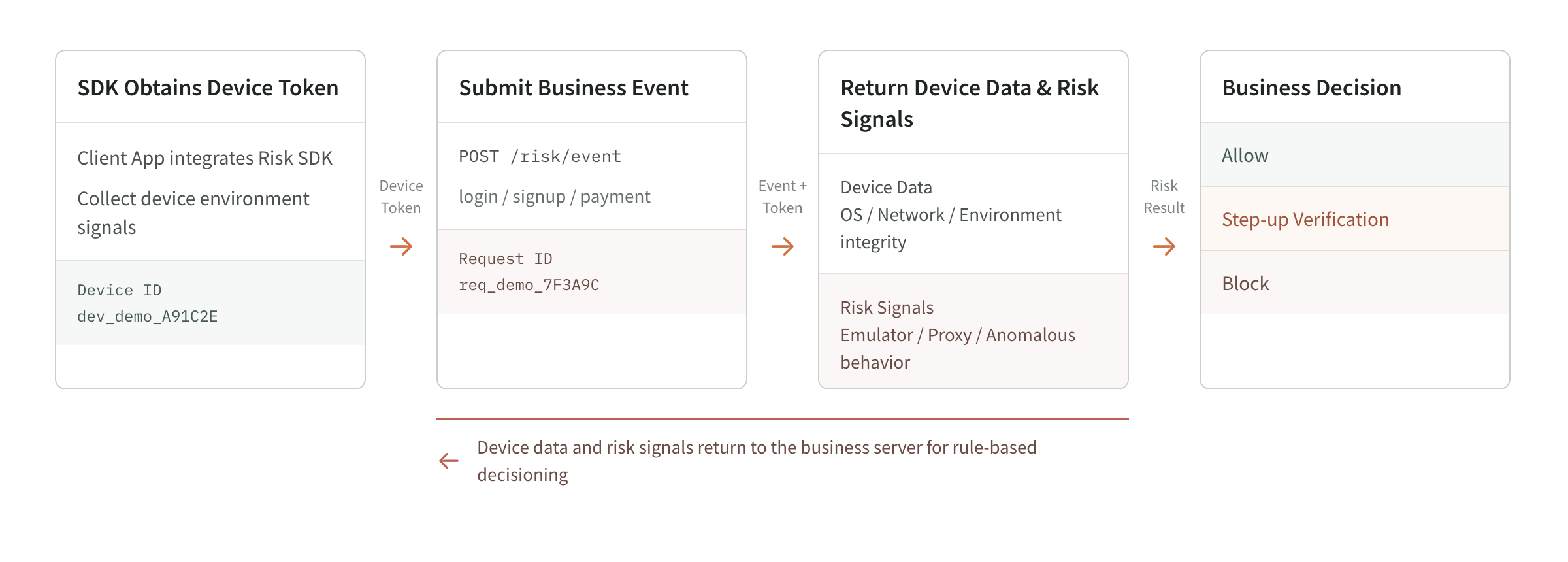
GEELAB Device Fingerprint is a device identification and risk analysis service. After integrating the GEELAB SDK, an application can initiate an identification request during key operations such as registration, login, transactions, and coupon claims. Based on device and runtime-environment data, GEELAB generates a device_id for the identified device and a request_id for each request, and provides 40+ categories of risk signals, including emulators, cloud phones, device-tampering tools, proxy IPs, and rooted or jailbroken devices.
Device fingerprint results are suitable for integration with business processes such as login, registration, transactions, coupon collection, and content access, and are used to supplement traditional identification methods such as account numbers, cookies, mobile phone numbers, and IP addresses.
Basic working method
A complete identification usually includes the following steps:
- Client apps make identification requests through the web, iOS, or Android SDK.
- The integration uses its own Public API Key to identify the source of the request.
- Geelab verifies applications, integrations status, and source or application signing rules.
- Geelab analyzes the device and operating environment information in this request.
- The system forms an identification event and generates a unique
request_id. - The identification results include
device_idand zero or more risk signals detected for this event. - The client server can continue to use the Region server key to query event details, or receive event notifications through Webhook.
Device fingerprint results are one input into a risk decision. Your business system must still decide whether to allow, challenge, restrict, or block an action based on the specific scenario.
core output
| output | meaning | Common uses |
|---|---|---|
request_id | Unique identifier for a single identification request | Query events, correlate business logs, and investigate event-related issues |
device_id | Device identification recognized by Geelab | Correlate multiple events from the same device to form a device view |
| risk signal | The risk environment or abnormal characteristics detected in this event | Risk classification, enhanced verification, investigation of abnormal access |
| Event details | Device, network, environment, and signal data for the request | Review risk details and trace events |
The specific returned fields are subject to the field reference of the SDK and Server API used.
Stable identification of changing device environments
In web scenarios, cookies, local identifiers, or some device characteristics may change due to cache clearing, browser upgrades, or changes in the operating environment. Geelab will combine multi-dimensional device and operating environment characteristics for similarity matching. When direct identification is not available, it will still identify accesses that are highly similar to historical devices as much as possible.
This identification method can reduce the duplication of device counting caused by the loss of a single identification, and improve the continuity of device identification in continuous access, account registration, login and marketing activities. The identification results will be returned together with the current device characteristics and risk signals for your business system to make further judgments based on specific scenarios.
Protect identifying data and business requests
The GEELAB SDK uses code hardening and data encryption to protect device and runtime-environment data used for risk identification, reducing the risk of interception or tampering in transit. Your backend only needs to submit the device token generated by the SDK and does not need to parse the device data itself.
For scenarios such as registration, login, and transactions that need to prevent requests from being replaced or reused, you can bind the device token to your business's unique credentials, such as business serial number, Request ID, or SSO token. Geelab will return the corresponding signature digest after parsing the request. Your server can use the original business credentials to generate the digest and complete the comparison without providing the original credentials to Geelab.
Through this verification, you can confirm whether the device identification result matches the current business request, reducing the risk of normal device tokens being stripped and used for other requests or other devices. The specific binding fields and verification methods are subject to the SDK and Server API documents used.
From device identification to business risk decisions
Geelab's identification results are divided into different levels to facilitate your gradual access according to business maturity:
| level | what you can gain | Suitable for how to use |
|---|---|---|
| device facts | device_id, device environment, network and client properties | Associate devices, query historical events, and establish basic portraits |
| risk signal | Specific abnormal characteristics, hit reasons, risk levels and confidence levels | Trigger enhanced verification, manual review or observation |
| business risk results | Combining risk labels and risk scores after business actions | Assist business decisions in registration, login, transaction and other processes |
A basic integration provides stable device facts and risk signals. Business risk results should be assessed together with the specific scenario and business event; a single risk signal should not be treated as the final disposition decision.
How the results help you make decisions
In a risk signal, level describes the signal's risk severity and confidence describes how confident the system is that the signal was detected. Neither equals your business's ultimate risk. The same signal may be handled differently in registration, login, payment, and other scenarios.
It is recommended to map the results to your own business actions:
- Low risk or no obvious abnormality: release as normal and continue to observe.
- There are signals that require confirmation: adding verification codes, secondary authentication, or manual review.
- Multiple signals and business behaviors jointly point to high risks: restrict sensitive operations or block this request.
Do not block a user solely because of one signal. A device_id identifies a device; it is not proof of a person's identity.
Typical usage scenarios
Account registration and login protection
Identify whether the same device frequently registers multiple accounts, or determine whether a login comes from a device environment that is significantly different from the historical record. Businesses can trigger SMS verification, secondary authentication or manual review based on account rules.
Marketing activities and rights abuse prevention
Associate device_id with coupon, lottery, trial, or new-user benefit records to detect repeated claims or bulk operations from the same device.
Transaction and sensitive operation protection
Initiate identification before operations such as payment, withdrawal, and modification of security information, and decide whether to add verification steps based on risk signals.
Abnormal environment identification
Identify emulators, cloud phones, tampering tools or other abnormal operating environments. The support platforms and meanings of different risk signals may be different, and the risk signal reference should prevail.
Risk investigation and issue review
Security and fraud-prevention teams can open the event list from a risk signal, review event details and historical events associated with devices, and determine when suspicious access occurred, the device environment involved, and its scope of impact.
Continuously enhanced product capabilities
- Support risk labels and risk scores in more business scenarios.
- Link devices, networks, accounts, and business behavior to support more informed risk decisions.
- Under the premise of clear authorization and configuration by customers, higher-level policy assistance and automated processing capabilities are provided.
Product usage boundaries
When using Geelab Device Fingerprint, the following boundaries should be noted:
- Device identification cannot replace account authentication, payment authentication, or other legal identity verification.
- A single risk signal is not necessarily sufficient to prove fraud, and it is not recommended to permanently ban a user based on just one signal.
device_idrepresents a device identification result, not a person's identity.- device, systems and network environments may change, and the risk strategy should allow for reasonable changes and be judged based on the business context.
- The data that can be queried by the console is limited by Region, application permissions, and package data retention period.
- The device attributes and risk signals available on different platforms may differ. For example, Native SDK scenes typically don't have browser properties.